Version 1.5.0 is here, and it's a big one
ReleaseSobuu 1.5.0 landed last week, and I’ve been waiting a long time to write this post.
It took me longer than I wanted, but this release had to be perfect (spoiler: it wasn’t, more on that later), so I tested, and tested, and tested again until everything finally behaved.
Here’s what’s inside:
- Shelves
- Kids restrictions
- Book search improvements
- More statistics, less statistics
- UI improvements
- Bug fixes
Let’s go.
Shelves
This is the one. The biggest thing to land in Sobuu in a very long time, and the feature I’ve been itching to build since almost the beginning.
Two reasons. First, selfish: I want to organise my own future reads. Second, the bigger one: I imagine Sobuu as a place where you find your next book because another reader put it on a list — we call those lists shelves — and anyone can help fill them.
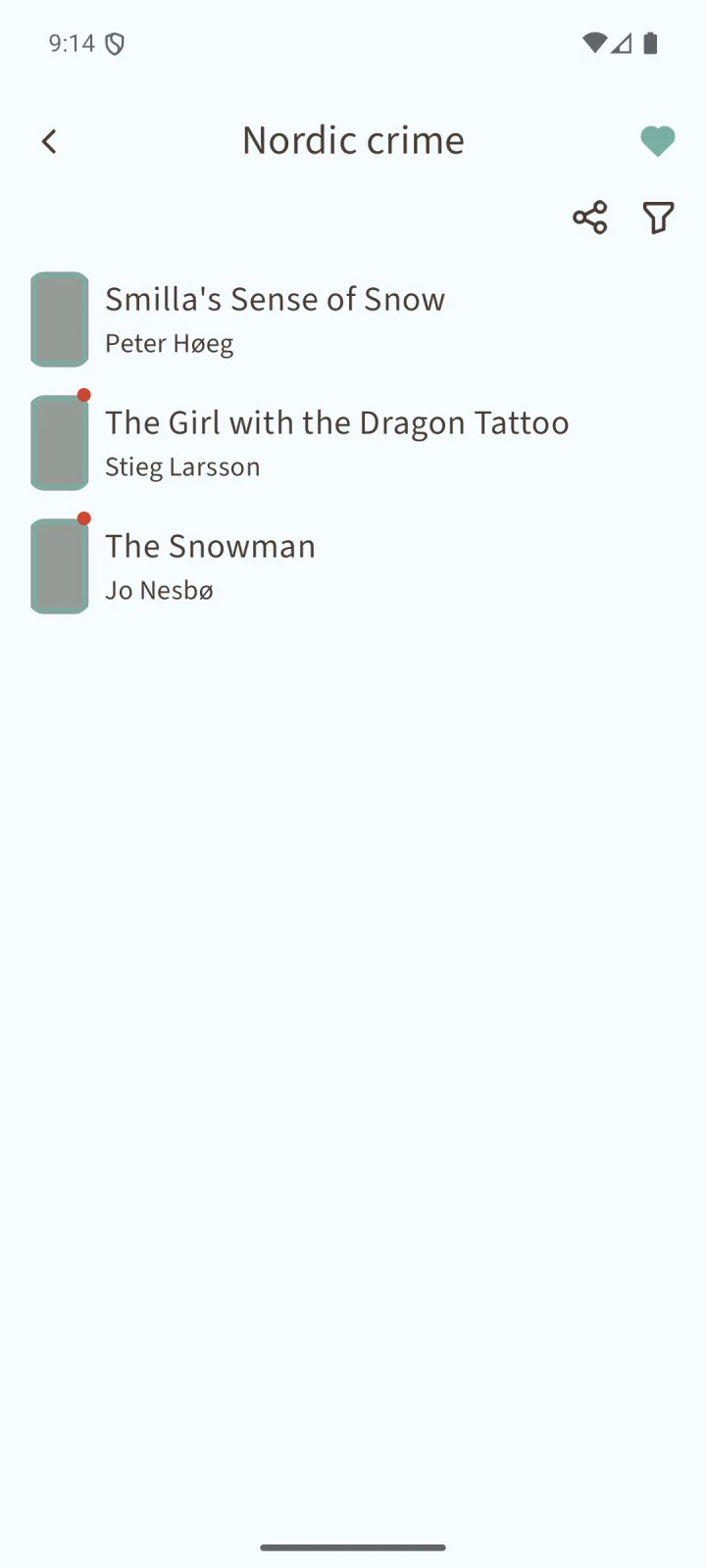
So here’s how it works. Anyone can create a shelf, give it a name and a description, and start throwing books at it. Public or private, your call. If it’s public, you decide whether the rest of the world can add books to it or whether it stays yours alone. Your username and avatar is displayed on top with every public shelf you make, and other readers can follow the ones they love with a single tap.
Sobuu comes with its own curated shelves too, and there’s at least one set for every supported language. I’ve started with shelves of award-winning books and some more thematic ones (rural life, for example). More will follow, though please don’t expect a fresh curated list every week just yet.
Some of those shelves now greet you on the search screen before you even type a word, so there’s always something to fall into. And when you want to go hunting on purpose, there’s a brand new discovery screen waiting for you.
Shelves changed the book page too. There’s a button up in the top menu to drop that book onto a shelf, and down at the bottom, an indicator showing every shelf it already lives in (yours and the public ones).
Three shelves build themselves: your current reads, what you’ve finished reading, and what you gave up on. The home screen shows the five most recent books of each, and the full shelf is always one tap away.
And that unlocks something I had wanted to offer in Sobuu also: your reading life from before Sobuu. Finished a novel three years ago? Drop it in “Already read”, pick the dates you started and finished, write what you thought of it, done. Same for the ones you abandoned halfway. It pays off immediately, because once Sobuu knows what you’ve read, those books get marked with an icon in every single shelf you open (yours, mine, anyone’s).
Shelves can grow monstrous, I know. That’s why you can filter by title or author, and sort by newest, oldest or alphabetically. More filters may come, but these should carry you for now.
Right next to the filter button sits my favourite little detail: the share button. Tap it and Sobuu builds an image with the covers of the first eight books, the shelf name, its description and how many books it holds. Ready to post anywhere.
And I’m nowhere near done. The discovery screen still needs its own filters and sorting, and maybe some recommendation logic so the shelves that match your taste find you. That would make those search screen suggestions a lot smarter too.
Kids restrictions
This one wasn’t a wish. It felt more like homework.
The app stores (not all of them, only the Play Store so far) kept reminding me that in some regions, an app with social features can’t be handed to children.
But Sobuu is a reading app. As I wrote in “Why Sobuu exists?” , the whole point is helping more people enjoy reading at their own pace, by their own rules, and kids today need that habit more than ever. So instead of closing the door, I added the restrictions. For users the Play Store considers under 13: no comments, no reviews, no public shelves, neither creating nor discovering them. I just provide the tools. It’s the parents who decide whether the app is safe for their kids.
Book search improvements
The other heavyweight of this release.
Honestly, the old search was bad. Unless you typed an ISBN, the results were barely useful. With shelves arriving, that simply couldn’t stand.
Titles and authors are now properly represented in the results, and thanks to pagination a search can bring back more than 100 books instead of stopping dead at 20. Still a work in progress though. I’ll keep tuning it whenever I spot room to improve.
More statistics, less statistics
There was one number I always wanted in front of me: pages read per day, per week, per month and per year. Not to compete with anyone, not to read more every month. Just pure curiosity. So I added it and now this statistic has its own panel on the home screen.
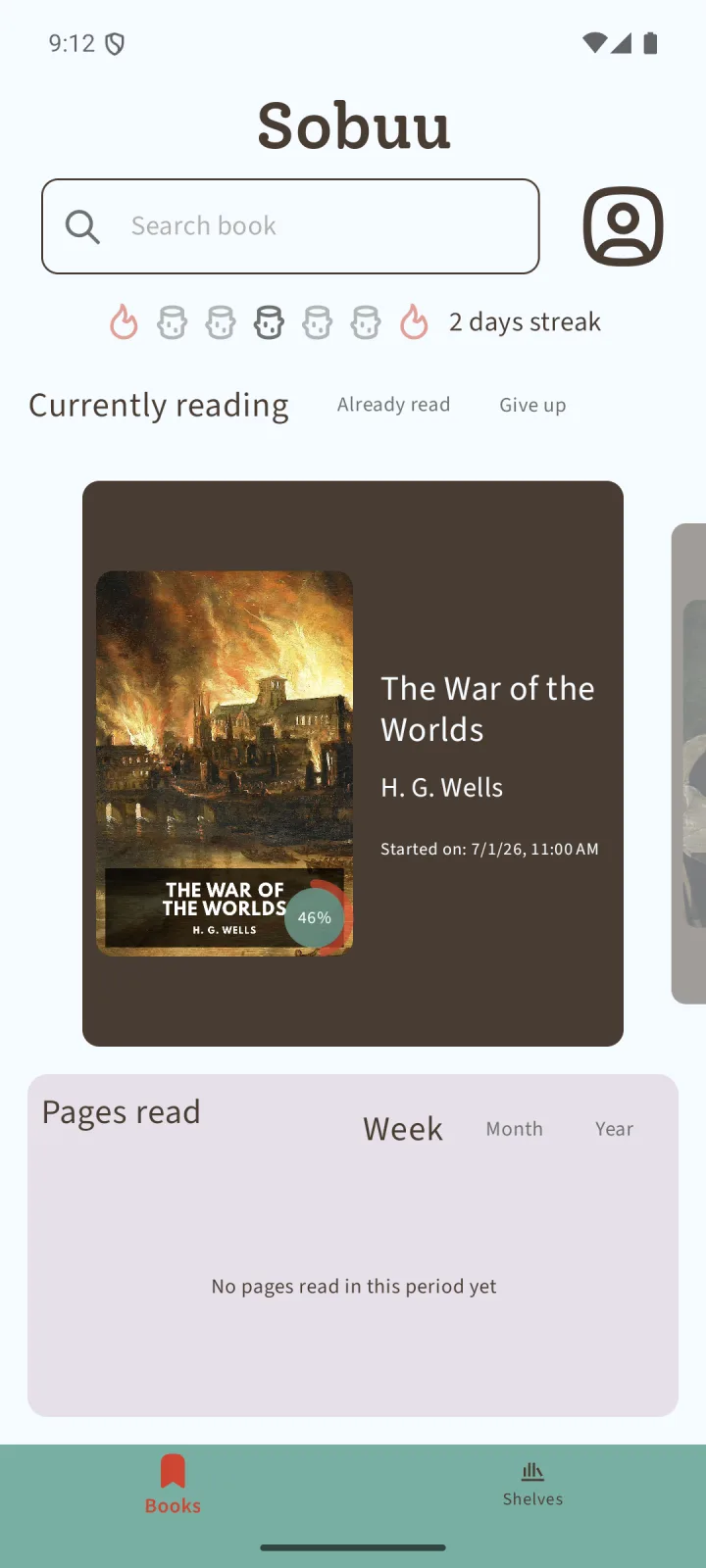
It ships disabled, for two reasons. It does rough up the clean look of the home screen a little, and it’s probably not a number everybody wants staring at them. If you’re one of us, head to the new statistics options in settings and switch it on.
Same screen, opposite direction: you can now turn streaks off. I read every day, and not breaking the streak is what pushes me sometimes to squeeze in five pages on a day with ten free minutes. But as I’ve said here and in “Why Sobuu exists?”, the app adapts to the reader, not the other way around. If streaks aren’t your thing, hide them. They keep counting quietly in the background, so if you ever want them back you’re not starting from zero. Hiding is just hiding.
UI improvements
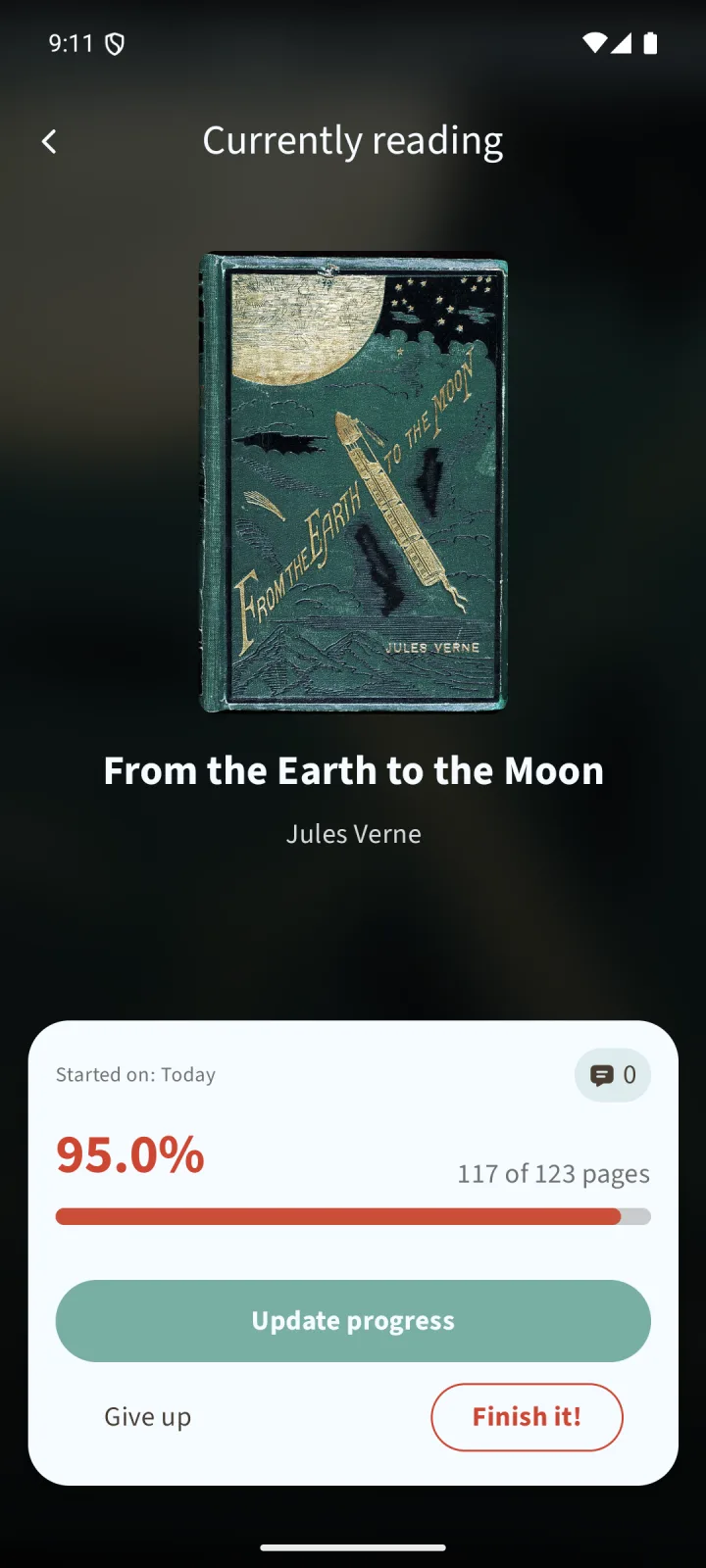
I still can’t quite believe how good the new Currently Reading screen looks. The blurred cover in the background, the cover animation as it opens, the buttons perfectly placed on the bottom. The old one always felt to me like a blank canvas, and this is my answer. Other screens are next, little by little (I’m looking at you, comments screen), with more animations and transitions on the way.
The dark theme got a tune-up as well: better contrast, nicer colours. Tell me what you think of it now.
And tier lists finally stepped out of hiding. The feature was already there, buried behind a long press that almost nobody found. Now there’s a real button on the home screen, in the “Already read” tab. Build a tier list from the books you read over any period and share it with the world.
Bug fixes
And now the part where I confess. These are the things that shouldn’t have been there, that I found (and that you probably found too).
Top of the list: the share dialog that ambushed you the second the app opened. That dialog is supposed to arrive when you finish a book, when recommending Sobuu actually makes sense, not in your first minute with it. It’s finally where it belongs.
Meanwhile, the thing that should have shown at startup wasn’t showing at all: statements. Statements are how I talk to everyone who opens the app, for when the privacy policy or the terms change, or when there’s something every reader needs to know. Not a feature I plan to abuse, but a good one to have. It turned out they never appeared in production. Now they do, so I can make statements again.
The rest of the hunt:
- Tier list screen UI issues: wrong colours, texts running too long. Fixed.
- Comments in guest mode weren’t landing on the right page, and the comments screen was showing the wrong page number at the bottom. Both fixed.
- Deleting your account from the app simply didn’t work. It does now.
- Sharing an image sometimes lost the text with the hashtags on its way to other apps. Fixed.
- Several dependencies updated.
That’s 1.5.0. And I’m not slowing down: the next version is already on my mind, with more fixes (I have found a few nasty errors in this version that went out of my radar during the several testings), more shelves work and wider distribution. Stay tuned here on the blog or on the Sobuu Mastodon accounts.
Enjoy the read!